Context bloat
Reading one big log file quietly fills most of the context window.
Know Your Tokens 2.4
Claude Code, Codex, Gemini CLI, OpenCode and any other agent, in one local dashboard. See which prompt blew up your context and why. Every tool, skill and MCP server too. Free, open source, and it never leaves your machine.
npx knowyourtokensEvery request, every project, all time. Live as you work.
Works with every agent
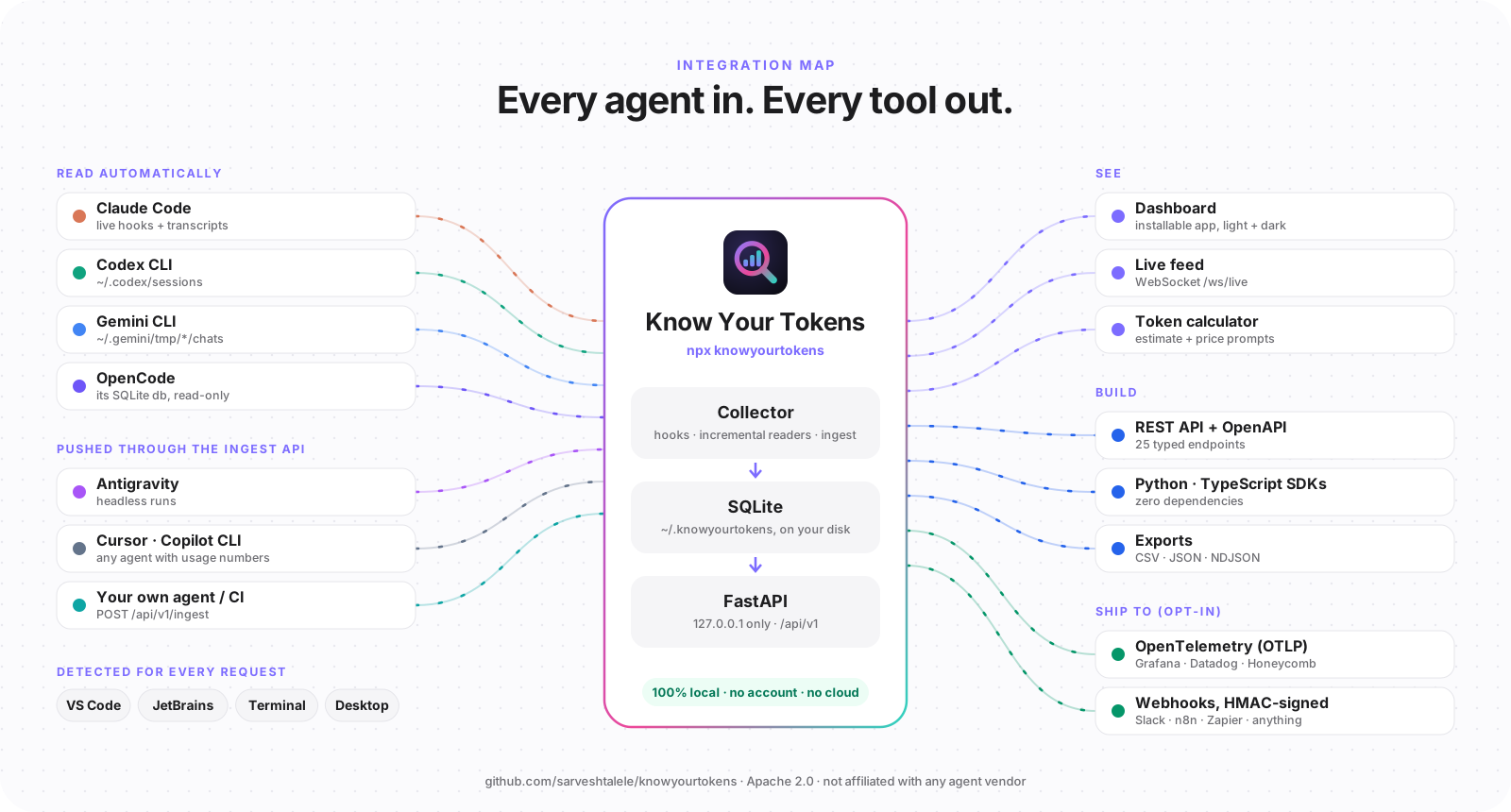
Four agents are read automatically from the logs they already keep. Anything else (Antigravity, Cursor, Copilot CLI, the agent you built) pushes one JSON record per request. Same charts, same debugger, side by side.
~/.claude/projectsTranscripts + live hooks~/.codex/sessionsPer-response usage records~/.gemini/tmp/*/chatsChat logs, last write wins~/.local/share/opencodeIts SQLite db, read-onlyPOST /api/v1/ingestAntigravity, Cursor, Copilot CLI, CI jobs, your own agentAntigravity encrypts its local conversations and doesn’t expose token usage, so it’s tracked by pushing usage, for example from headless runs. Token share above is sample data.
Demo
A real 287,000-token request, traced back to the log file that caused it. Then a quick tour of everything else, from install to API.
The problem
Tokens are your budget, your latency and your context window. Every coding agent records them, then shows you almost none.
Reading one big log file quietly fills most of the context window.
A session got slow and expensive. Which request did it?
Usage is split across sessions, projects, models and IDEs.
Which MCP servers, skills and tools earn their keep? No idea.
Naive transcript parsers count a request once per content block.
You rewrote the prompt or CLAUDE.md. Did it actually help?
Numbers in these illustrations are examples, except the 2.5× over-count, which we measured on real Claude Code transcripts.
Interactive demo
This is the real dashboard layout with sample data. Watch the guided tour, or click anything to take over.
Every request, every project, all time. Live as you work.
How it helps you debug
Your agent shows you the answer. Know Your Tokens shows you the question: exactly what was sent, what each part cost, and whether your fix worked.
Example request · illustrative numbers
Evaluate
Sort requests by size, see what was cached, and watch each project’s tokens per request over time, so you know which prompts, habits and changes are worth keeping.
Cached tokens are cheaper and faster. Low rates flag prompts that break the cache.
Sample data.
Token calculator
Paste a prompt, a file or a log. Everything runs in your browser. The app has the same calculator, plus your real usage priced at your own rates.
Estimate (±15%). Inside the app, every count your agents record is exact.
23.5% of the window · plenty of room
Type your provider’s rates to see a cost. We don’t ship prices: they depend on your plan.
Made for everyone who codes with AI agents
Debugging prompts
Your agent shows you the answer. Know Your Tokens shows you the question: the full context that was sent, what each part cost, and which tool result made it explode. Fix the pattern once and every future session gets cheaper and sharper.
cat logs/checkout.logtail -n 200 logs/checkout.log | grep -i giftStop guessing why a session got slow and expensive.
Usage you can actually reason about.
Observability without a data-sharing review.
Know how your tools behave in the wild.
Lives where your apps live
Install the dashboard as an app straight from the browser (“Install app” in the top bar), or let the CLI create a native launcher with its own icon.
$ knowyourtokens shortcut --dockCreates “Know Your Tokens.app” in ~/Applications and adds it to your Dock.
Get started
$ npx knowyourtokensFinds your agents, sets up a private Python env (offering to install uv if it’s missing) and starts everything. Needs Node 18+.
$ knowyourtokens shortcutAdds an app icon for your Dock, taskbar or launcher. Or click “Install app” in the dashboard.
$ claudeNothing changes in your workflow. The dashboard fills in live as you work, and history is backfilled.
npx knowyourtokensInstallation guide
Runs the installer and the dashboard. Check with node --version. Get it from nodejs.org.
The backend is Python. If uv is missing, the installer explains why it needs it and asks before installing it. uv then downloads its own Python, so you don’t need one.
Claude Code, Codex CLI, Gemini CLI or OpenCode. Others can post usage to the ingest API.
For the private Python environment. Your usage data stays small (SQLite).
brew install nodenpx knowyourtokensnpx knowyourtokens autostart enable && npx knowyourtokens shortcutThe installer finds your agents, creates a private Python environment, installs hooks and starts the dashboard at http://localhost:5173. Re-running it is always safe.
npx knowyourtokens --yesnpx knowyourtokens --no-uvnpx knowyourtokens doctornpx knowyourtokens@latestAlmost every problem shows up here, with the exact fix printed next to it.
Logs live in ~/.knowyourtokens/logs (backend.log, daemon.log, frontend.log). Set KNOWYOURTOKENS_DEBUG=1 to print full stack traces.
npx knowyourtokens doctor
Re-run and answer Y, or run the official installer yourself, then open a new terminal.
Behind a proxy, set HTTPS_PROXY first. Alternatives: winget install astral-sh.uv (Windows), brew install uv (macOS), pipx install uv. Or skip uv with --no-uv if you have Python 3.10+.
powershell -ExecutionPolicy ByPass -c "irm https://astral.sh/uv/install.ps1 | iex"   # Windows
curl -LsSf https://astral.sh/uv/install.sh | sh                          # macOS / Linux
Hyper-V, WSL or Docker often reserve port ranges that include 8000. Know Your Tokens now picks the next free port automatically and remembers it; you can also choose one.
The first start on Windows can take a minute while Python compiles. If it still times out, allow Python through Windows Defender Firewall for private networks, and exclude ~/.knowyourtokens from real-time antivirus scanning.
netsh interface ipv4 show excludedportrange protocol=tcp
$env:KNOWYOURTOKENS_BACKEND_PORT=8123; npx knowyourtokens start
Another program holds the port. Stop the old copy first; if the port belongs to something else, Know Your Tokens moves to a free one, or pin your own with KNOWYOURTOKENS_BACKEND_PORT / KNOWYOURTOKENS_DASHBOARD_PORT.
npx knowyourtokens stop && npx knowyourtokens start
Check status, then restart. A VPN or corporate proxy can intercept 127.0.0.1: add localhost and 127.0.0.1 to NO_PROXY.
npx knowyourtokens status
npx knowyourtokens start
Only when you used --no-uv. Install Python 3.10+ (python.org, or winget install Python.Python.3.12), or drop --no-uv so uv provides Python.
Don’t run with sudo or as Administrator. On Windows, close terminals and editors holding files in ~/.knowyourtokens, pause antivirus or OneDrive sync for that folder, and try again.
Run your agent once after installing, then refresh. doctor shows whether hooks are installed; re-running the installer re-adds them. Existing history is backfilled automatically.
npx knowyourtokens doctor
npx knowyourtokens install
Removes hooks, services, autostart and the app. Your data is kept unless you add --delete-data.
npx knowyourtokens uninstall --purge
Still stuck? Read the full troubleshooting guide or open an issue with the output of doctor.
Hooks record events the instant they happen. A small daemon reads new transcript lines for exact usage and full text, and catches up on anything missed while it was off.
npx knowyourtokens sets up a Python env, finds Claude Code, Codex, Gemini CLI and OpenCode, and starts everything.
Nothing changes in your workflow. Logs are read, never written; anything else can push one JSON record per request.
Open the dashboard, call the API, or stream metrics to the observability stack you already run.
The dashboard is one client among many. Build cost reports, team rollups, Slack bots, or Grafana panels on the same API.
# Totals for June, in your local time zone
curl "http://127.0.0.1:8000/api/v1/usage/summary?start=2025-06-01&end=2025-06-30"

# Every request for one project, newest first (paginated)
curl "http://127.0.0.1:8000/api/v1/usage?project=my-repo&page_size=100"

# Stream everything as NDJSON
curl "http://127.0.0.1:8000/api/v1/reports/export?format=ndjson" > usage.ndjson

# Machine-readable contract
curl http://127.0.0.1:8000/openapi.json
25 typed endpoints with a published OpenAPI document. Interactive docs at /docs while the backend runs.
Know Your Tokens runs entirely on your computer. It sends nothing about itself to anyone. The only way data leaves is through an exporter you configure.
# Keep 90 days of rows, 14 days of full text
export KNOWYOURTOKENS_RETENTION_DAYS=90
export KNOWYOURTOKENS_FULL_TEXT_RETENTION_DAYS=14

# Never store prompt/response text at all
export KNOWYOURTOKENS_STORE_FULL_TEXT=0

# Everything, gone
knowyourtokens uninstall --purge --delete-dataYes. Apache 2.0 licensed: use it, fork it, embed it, ship it commercially. If you redistribute it or build on it, keep the NOTICE file that credits its creator, Sarvesh Talele. Contributions are welcome.
One command installs the backend, the dashboard and the hooks. Undo it just as easily.